


Connect Your Website Form to a CRM

A website form should do more than send an email. Learn how small businesses can connect form enquiries to a simple CRM to reduce missed leads, improve follow-up, and keep sales work organised.
Olymaris Team
Published on August 10, 2026
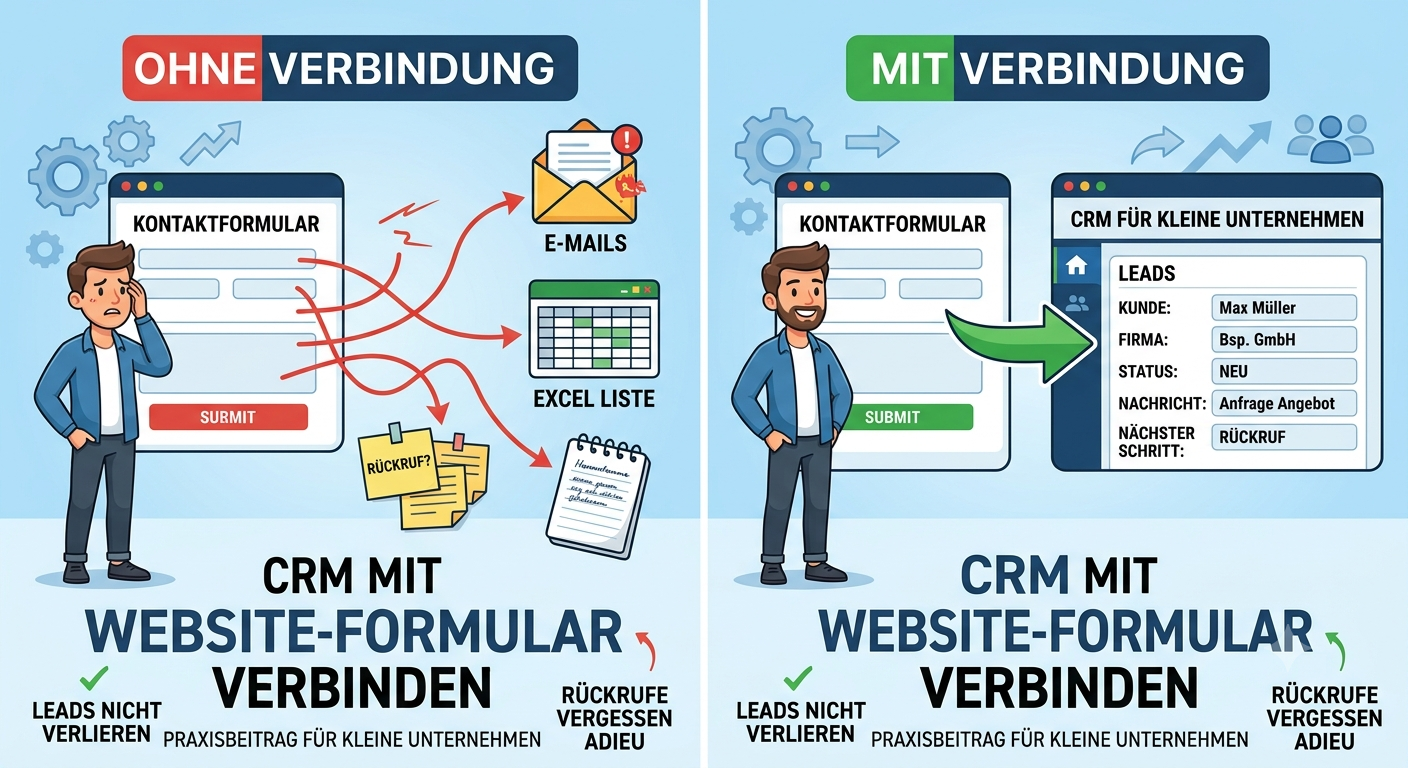
Practical CRM setup for small businesses
Connect Your Website Form to a CRM
For many small businesses, the website contact form is the first step in a sales conversation. But if every enquiry only lands in an inbox, the process quickly becomes fragile. Messages get buried, follow-ups depend on memory, and managers lose visibility over which leads are new, qualified, quoted, or still waiting for a reply.
Connecting your website form to a CRM solves a very specific business problem: it turns incoming enquiries into trackable work. Instead of treating each message as a one-off email, you create a clear record inside your sales process. That is especially useful if you are already looking at a simple CRM for small businesses and want a practical first use case.
Short answer: why connect a form to a CRM?
Because a form should not stop at notification. It should create a lead, store contact details in one place, and make the next step visible to the team. That helps small companies respond faster, avoid duplicate work, and keep opportunities from disappearing between email, spreadsheets, and chat messages.
- Every new enquiry is captured in one central place.
- Your team can track status, notes, and follow-up tasks.
- Managers get a clearer view of pipeline activity.
- Customer conversations become easier to continue later.
What changes in daily work
Before
A website form sends an email. Someone reads it, forwards it, copies details into a spreadsheet, or plans to reply later.
After
The enquiry enters the CRM as a lead with contact details, source information, and a visible next step for the team.
This does not need to become a large technical project. In many cases, the real value is simple: fewer missed leads, cleaner handover between team members, and better control over offers and follow-ups. If your business is still relying heavily on spreadsheets, our related article on when to replace Excel with a CRM explains why this step often becomes necessary.
What information should move from the form into the CRM?
Not every company needs a complex setup. For most small businesses, the useful starting point is basic but consistent information that helps the team act quickly.
Contact details
Name, company, email, phone number, and the best way to reply.
Enquiry context
Message content, service interest, and where the lead came from.
Next-step visibility
Owner, status, reminder, or follow-up task so nothing depends on memory alone.
Once leads are inside the CRM, they can move into a clearer process. That is where a simple lead pipeline for small businesses becomes useful: new enquiry, qualified lead, offer sent, follow-up due, won, or lost.
Common mistakes to avoid
Treating the form as an inbox tool only
If the form only sends an email, the business still depends on manual sorting and memory.
Collecting data without a process
A CRM record is useful only if someone can see what should happen next.
Making the setup too complicated too early
Most small teams do better with a lean first version than with a large workflow they will not maintain.
How this fits into a simple CRM strategy
This article focuses on one practical step: turning website enquiries into structured CRM records. If you are still deciding whether a CRM is worth it, start with the broader guide CRM for Small Businesses: A Practical Guide to Starting Simple. That guide covers the wider decision. This page is about one of the most useful early wins after that decision is made.
Next step: make website enquiries easier to manage
If your team is still handling form submissions through inboxes, spreadsheets, or scattered notes, a simple CRM setup can give you a clearer process without unnecessary complexity.
Comments
0 published comments
No approved comments have been published yet.
Recommended Articles
Fresh insights from our blog

AI Automation for Small Businesses: What Is Actually Worth It?
Not every AI idea is worth the effort. This guide shows small businesses which workflows are worth automating first, how to judge readiness,...

CRM for Small Businesses: A Practical Guide to Starting Simple
A practical guide for owners and managers who want a simple CRM without turning sales into a software project. Learn when a CRM is worth it,...

Turn Your Website Into a Sales Machine: More Leads and Revenue
A practical guide for small businesses that want their website to do more than look good. Learn how clearer messaging, stronger trust, bette...

Medical Practice Website: Booking, Forms, Costs
A practical guide to building a medical practice website that helps patients book online, submit forms, and understand what affects cost.

Driver Tracking for Small Transport Companies: Features and Costs
A practical guide to driver tracking for small transport companies: what it does, what to look for, and how to think about cost and rollout.

Holiday Apartment Website with Booking System: What Owners Really Need
A practical guide for holiday apartment and serviced apartment owners who want a booking website that shows availability, builds trust and t...