

Follow-Up Automation for Small Businesses

Follow-up automation helps small businesses keep track of open enquiries, quotes and next steps without adding a complicated sales system.
Olymaris Team
Published on October 5, 2026 · Updated October 5, 2026
Optional external content
This media loads from an external source and stays blocked until you accept optional cookies.
Follow-up automation for small businesses
Many small businesses do not lose leads at the first contact. They lose them in the gap after the enquiry, after the quote, or after the “we will get back to you” moment. A lead comes in, a quote is sent, someone promises to call back, and then the next step gets buried under email, admin work and urgent client tasks.
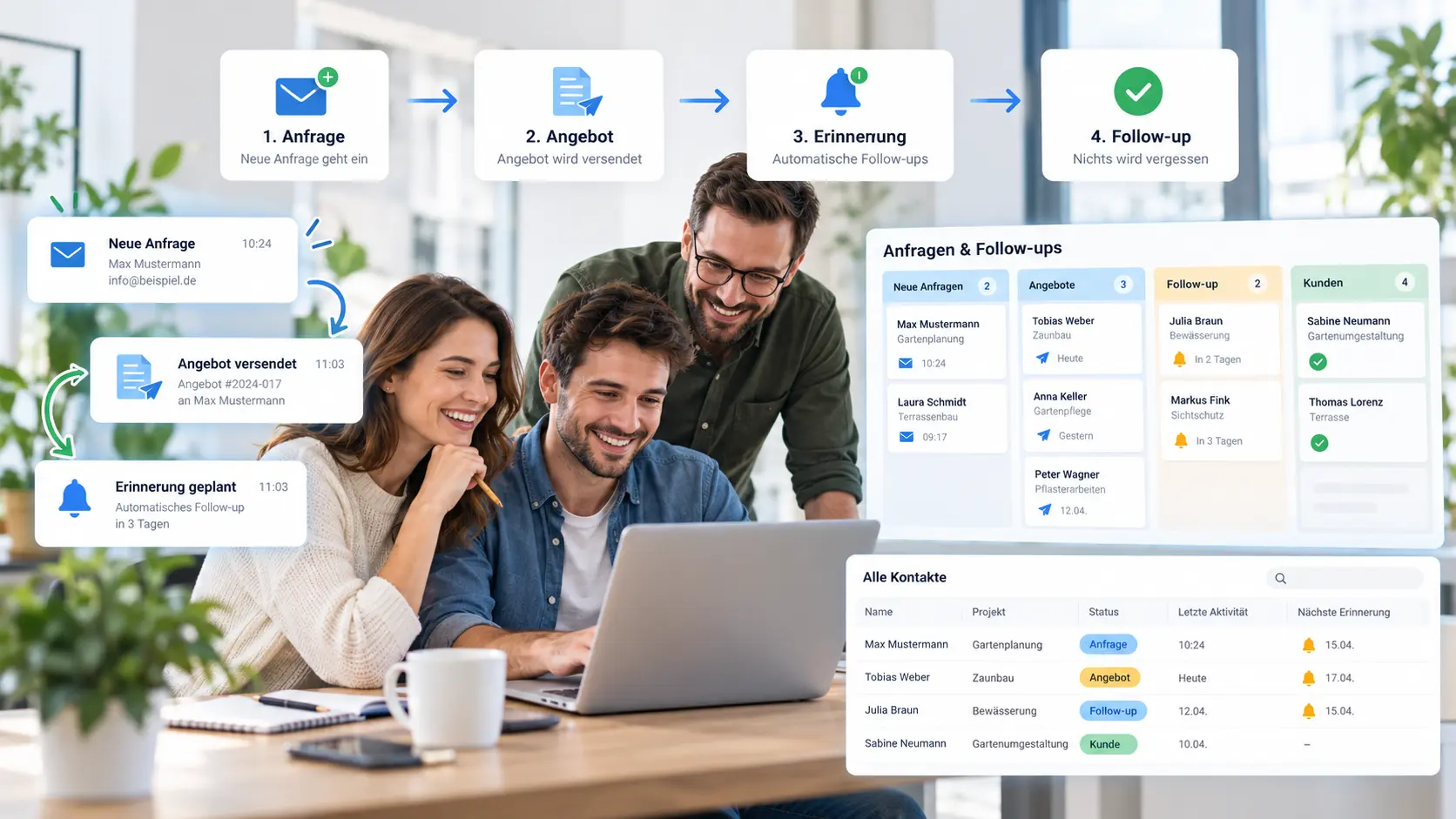
That is where follow-up automation becomes useful. The point is not to send more automated messages. The point is to keep open opportunities visible, prompt the right next step and help your team respond before interest fades.
If you want the broader view on where automation is worth the effort, start with AI Automation for Small Businesses: What Is Actually Worth It?. This article stays narrower and more practical: how to stop warm leads from going cold.
What follow-up automation actually does
Follow-up automation adds structure after a lead already exists. Instead of relying on memory, inbox searches, or scattered notes, your business sets simple rules for what should happen next when a contact is still open.
Common triggers
- A website enquiry has not been answered yet
- A quote was sent but no reply came back
- A call or meeting ended without a clear next step
- Missing information still needs to be requested
Useful outcomes
- Internal reminders instead of forgotten leads
- Draft replies for faster response handling
- Clearer visibility of open quotes
- Less manual checking across tools
Signs your business is ready for it
- Your team repeatedly writes the same follow-up emails by hand.
- Open quotes are tracked in inboxes, spreadsheets and memory at the same time.
- No one is fully sure who should follow up next or when.
- Good leads cool down because the response gap is too long.
- You want more sales process discipline without buying a large, complicated system.
If that sounds familiar, follow-up automation is often one of the most practical entry points into AI Automation for Small Businesses.
Keep the workflow simple
Small businesses usually do not need a fully automated sales machine. They need a reliable process. In many cases, that means a simple workflow: capture the enquiry, assign a status, trigger a reminder, prepare a reply draft and record the next step.
For many small businesses, that does not require a heavy sales platform. It often starts with a simple workflow connecting email, forms, a CRM or Google Sheets. If your bottleneck starts earlier, before follow-up even begins, read Automatically Qualify Website Enquiries. If quote preparation is slowing down the process, Angebote schneller erstellen mit KI is the more relevant next read.
What this looks like in day-to-day operations
A service business might want every new quote to trigger a reminder if no reply arrives after a defined period. A small B2B team might want open contacts grouped by status so the next action is obvious. A founder-led company might simply need one place where unanswered leads stop disappearing into the inbox.
That is why follow-up automation is less about flashy AI and more about consistency. It helps your business react faster, reduce avoidable admin work and protect the value of leads you already paid time or money to generate.
Cost and scope: keep expectations realistic
Not every follow-up process needs a large implementation. Based on the current service scope, projects start from €1,500, depending on needs and complexity. A basic implementation takes around 45 working days. More tools, more workflows or deeper customization can increase both scope and timeline.
For many small businesses, that is a sensible way to start: fix one recurring sales bottleneck first, then expand only if the workflow proves useful.
Next step
If your team is manually chasing open enquiries, quotes or callbacks, a simple follow-up workflow may be the most practical automation to start with.
Comments
0 published comments
No approved comments have been published yet.
Recommended Articles
Fresh insights from our blog

AI Automation for Small Businesses: What Is Actually Worth It?
Not every AI idea is worth the effort. This guide shows small businesses which workflows are worth automating first, how to judge readiness,...

CRM for Small Businesses: A Practical Guide to Starting Simple
A practical guide for owners and managers who want a simple CRM without turning sales into a software project. Learn when a CRM is worth it,...

Turn Your Website Into a Sales Machine: More Leads and Revenue
A practical guide for small businesses that want their website to do more than look good. Learn how clearer messaging, stronger trust, bette...

Medical Practice Website: Booking, Forms, Costs
A practical guide to building a medical practice website that helps patients book online, submit forms, and understand what affects cost.

Driver Tracking for Small Transport Companies: Features and Costs
A practical guide to driver tracking for small transport companies: what it does, what to look for, and how to think about cost and rollout.

Holiday Apartment Website with Booking System: What Owners Really Need
A practical guide for holiday apartment and serviced apartment owners who want a booking website that shows availability, builds trust and t...