


Event Admin Panel for Bookings and Attendees

See how an event admin panel helps small teams manage bookings, attendee lists, capacity, and check-in without drowning in manual admin.
Olymaris Team
Published on May 29, 2026
Event operations made simpler
Event admin panels should save time, not create more work
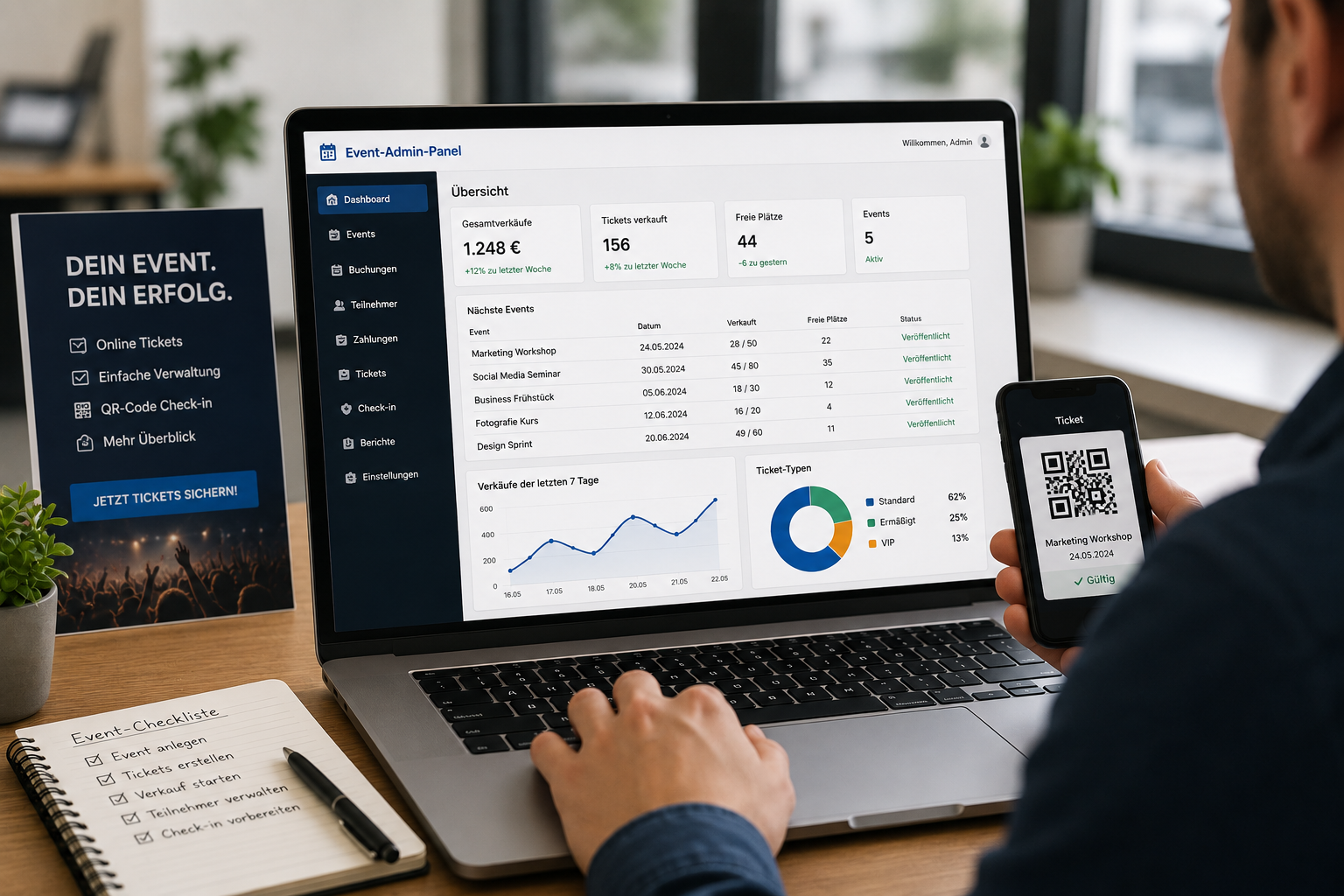
For small teams, the real challenge is not publishing an event page. It is keeping bookings, attendee data, capacity, and check-in under control once people start buying tickets. An event admin panel gives managers one place to see what is sold, what is still available, and what needs attention before the event day.
That matters because manual follow-up costs time. When bookings arrive through messages, emails, or spreadsheets, someone still has to confirm payment, update seat counts, and prepare the attendee list. A structured admin area reduces that friction and makes the whole event feel more professional for both the team and the customer.
What the admin panel helps with
- Booking overview in one place
- Attendee and capacity management
- Digital tickets and email confirmation
- QR code check-in on event day
Why this matters for business owners
- Less manual admin for small teams
- Fewer mistakes in seat counts and attendee lists
- Faster responses to customer questions
- A clearer process from sale to check-in
A practical workflow from booking to check-in
1. Booking comes in
Customers buy tickets through the event website with online ticket shop, so the team does not need to collect registrations manually.
2. The team reviews capacity
The admin area shows attendee and capacity management clearly, which helps avoid overbooking and last-minute confusion.
3. Check-in stays fast
On event day, digital tickets and QR code check-in make it easier to verify attendees without slowing down the entrance.
What small teams usually gain
Less spreadsheet work
Instead of updating lists by hand, the team works from one sales overview.
Better customer experience
Automatic confirmation and a clear booking flow make the process feel reliable.
More control before the event
Managers can see what is selling and adjust communication or capacity planning sooner.
Cleaner handoff on event day
The check-in process starts with a reliable attendee list instead of a last-minute search through emails.
How this fits the event website setup
An admin panel works best when it is part of a complete event website with online ticket shop. The public page handles discovery and sales, while the admin side handles the operational work behind the scenes. That separation keeps the customer journey simple and gives the team a clearer process.
If you want the broader business case behind selling directly from your own site, see the main guide on why event websites need to sell. For the implementation side, the related article on Stripe payments for event ticket sales is a useful next step.
What Olymaris can build
Olymaris builds event websites with your own ticket shop, online payment, digital tickets, attendee and capacity management, QR code check-in, and an admin area with sales overview. The basic implementation starts from €1,500 and takes around 45 working days, depending on scope and requirements.
That makes the admin panel a practical business tool, not just a technical feature. It helps small companies and startups sell events more cleanly and manage them with less stress.
Next step
If you are planning an event website with a ticket shop, start with the booking flow and the admin process together. That way, sales and operations support each other from day one.
Comments
0 published comments
No approved comments have been published yet.
Recommended Articles
Fresh insights from our blog

AI Automation for Small Businesses: What Is Actually Worth It?
Not every AI idea is worth the effort. This guide shows small businesses which workflows are worth automating first, how to judge readiness,...

CRM for Small Businesses: A Practical Guide to Starting Simple
A practical guide for owners and managers who want a simple CRM without turning sales into a software project. Learn when a CRM is worth it,...

Turn Your Website Into a Sales Machine: More Leads and Revenue
A practical guide for small businesses that want their website to do more than look good. Learn how clearer messaging, stronger trust, bette...

Medical Practice Website: Booking, Forms, Costs
A practical guide to building a medical practice website that helps patients book online, submit forms, and understand what affects cost.

Driver Tracking for Small Transport Companies: Features and Costs
A practical guide to driver tracking for small transport companies: what it does, what to look for, and how to think about cost and rollout.

Holiday Apartment Website with Booking System: What Owners Really Need
A practical guide for holiday apartment and serviced apartment owners who want a booking website that shows availability, builds trust and t...