


Website for Courses and Workshops That Sells Seats

Turn course interest into paid bookings with a website that handles schedules, payments, confirmations, and attendee management in one place.
Olymaris Team
Published on June 1, 2026
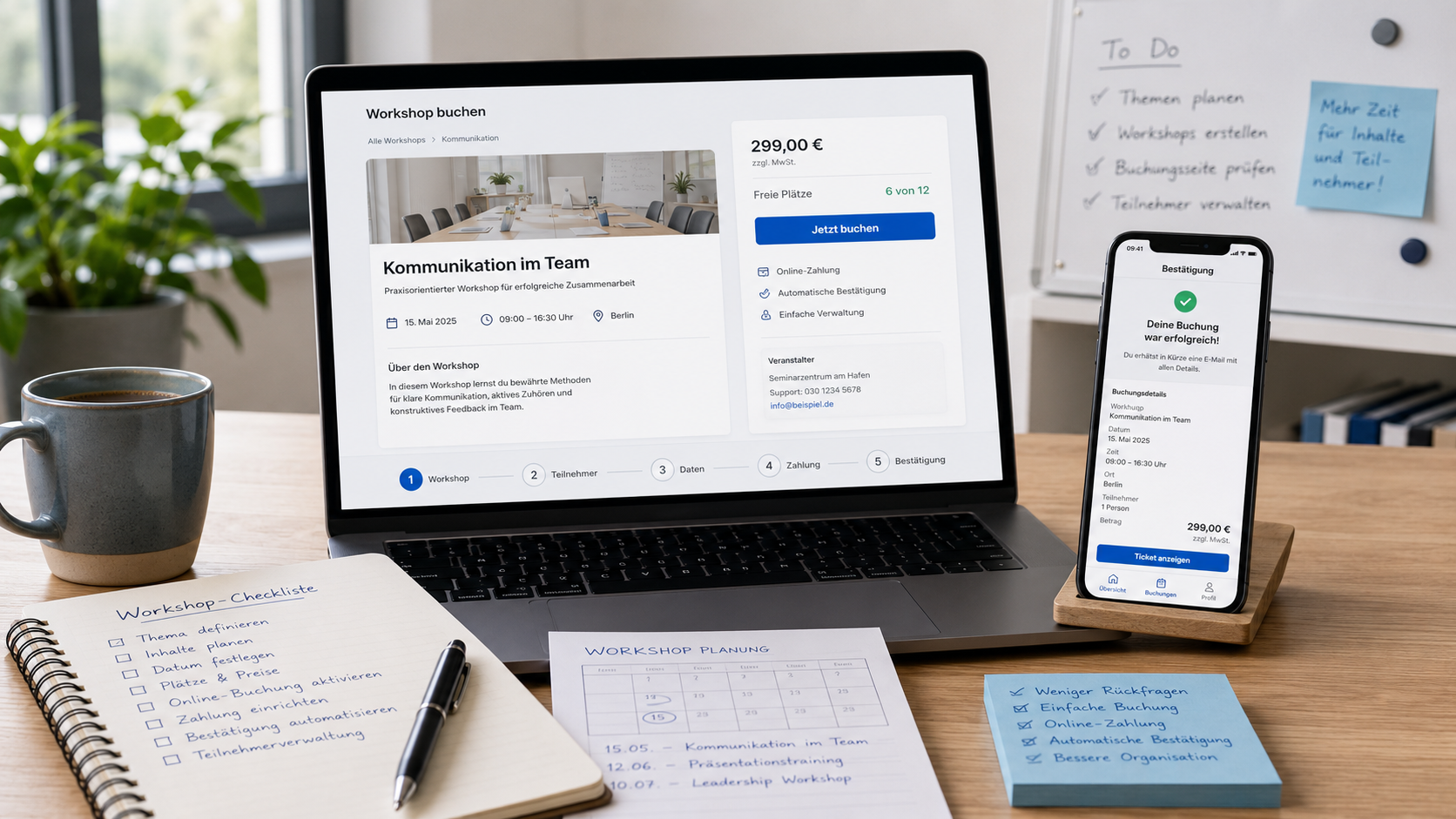
A course website should do more than explain what you teach
If people have to email for dates, ask about seats, and wait for payment instructions, you lose momentum. A better setup lets visitors understand the offer, choose a session, pay online, and receive confirmation without extra back-and-forth. That is especially useful for small teams that want fewer manual steps and a clearer booking process.
This is where an Event Website with Online Ticket Shop fits well. It gives course providers, workshop hosts, and training teams a direct way to sell seats while keeping the customer experience simple.
What visitors need first
People want the topic, date, price, seat availability, and a clear next step. If those details are easy to find, the page feels trustworthy and the decision becomes easier.
What your team needs
You need fewer manual messages, fewer spreadsheet checks, and a simple way to see who booked. That saves time and reduces avoidable errors.
What the business gains
A smoother booking flow can improve conversion, make planning easier, and present your offer more professionally than scattered forms or chat-based sign-ups.
A better booking flow for courses and workshops
For many small businesses, the real problem is not the website itself. It is the gap between interest and payment. A visitor may like the workshop, but if they must wait for a reply, they may move on. A ticket shop closes that gap by making the next step immediate.
Clear session pages
Each course or workshop can have its own page with the key details people need before booking.
Online payment
Customers can pay directly instead of waiting for manual invoices or payment instructions.
Automatic confirmation
After booking, attendees receive a clear confirmation by email, which reduces follow-up questions.
Capacity control
You can keep track of available seats and avoid overbooking or last-minute confusion.
Why this matters for small teams
A course business often runs on limited time. Every extra message about dates, seats, or payment adds work. A structured website reduces that load and helps your team focus on teaching, delivery, and customer care instead of admin.
- Less time spent answering the same booking questions
- Fewer missed sales because the next step is unclear
- Better visibility into which sessions are filling up
- A more professional first impression for new customers
How this supports your wider event strategy
If you already sell events, workshops, or training sessions, the website should help you sell directly instead of sending people to a separate platform. That is the same business logic behind the broader discussion in Own Ticket Shop vs. Third-Party Platforms: Why Event Websites Need to Sell. This page focuses on the narrower question: how to make course and workshop bookings easier to complete.
For teams that want to compare payment setup or attendee handling later, related topics like Stripe Payments for Event Ticket Sales and Event Admin Panel for Bookings and Attendees can help with the next decision.
Who this is a good fit for
Training providers who run recurring sessions
Workshop hosts who need simple online booking
Small companies selling paid learning events
Startups offering classes as part of a service
Managers who want fewer manual booking tasks
Business owners who want direct sales control
What a practical implementation usually includes
A useful setup usually combines a clear event page, a ticket or booking flow, payment handling, confirmation emails, and a simple admin view for bookings. The goal is not complexity. The goal is a system that helps people book faster and helps your team manage the result without extra admin.
Next step
If you want a website for courses and workshops that supports direct sales, attendee management, and a cleaner booking process, start with the service page and then contact us for the right setup.
Comments
1 published comments
Martin
Ich biete kleine Kreativ-Workshops in Chemnitz an und organisiere Anmeldungen bisher meist per WhatsApp und Excel. Im Artikel steht, dass eine Website mit Buchung, Zahlung und automatischer Bestätigung Rückfragen reduzieren kann. Könnten Sie genauer erklären, ab welcher Teilnehmerzahl oder Anzahl an Kursen pro Monat sich so eine Lösung für kleine Anbieter wirklich lohnt?
Admin reply
Hallo Martin, bei kleinen Anbietern lohnt sich so eine Lösung oft schon früher, als man denkt: nicht erst bei sehr großen Teilnehmerzahlen, sondern sobald die Anmeldung regelmäßig Zeit kostet. Wenn Sie zum Beispiel 2 bis 4 Kurse pro Monat anbieten und pro Kurs mehrere Nachrichten zu freien Plätzen, Preisen, Zahlung oder Bestätigung beantworten müssen, kann eine Website mit Buchung, Online-Zahlung und automatischer Bestätigung sinnvoll sein. Der wichtigste Punkt ist nicht nur die Anzahl der Teilnehmer, sondern der Aufwand dahinter: Weniger WhatsApp-Abstimmung, weniger Excel-Pflege, weniger Fehler bei Kapazitäten und ein klarerer Buchungsweg für Interessenten. Genau darum geht es im Artikel: ansehen, buchen, bezahlen und automatisch bestätigt werden.
Recommended Articles
Fresh insights from our blog

AI Automation for Small Businesses: What Is Actually Worth It?
Not every AI idea is worth the effort. This guide shows small businesses which workflows are worth automating first, how to judge readiness,...

CRM for Small Businesses: A Practical Guide to Starting Simple
A practical guide for owners and managers who want a simple CRM without turning sales into a software project. Learn when a CRM is worth it,...

Turn Your Website Into a Sales Machine: More Leads and Revenue
A practical guide for small businesses that want their website to do more than look good. Learn how clearer messaging, stronger trust, bette...

Medical Practice Website: Booking, Forms, Costs
A practical guide to building a medical practice website that helps patients book online, submit forms, and understand what affects cost.

Driver Tracking for Small Transport Companies: Features and Costs
A practical guide to driver tracking for small transport companies: what it does, what to look for, and how to think about cost and rollout.

Holiday Apartment Website with Booking System: What Owners Really Need
A practical guide for holiday apartment and serviced apartment owners who want a booking website that shows availability, builds trust and t...